formMain.vrf.annotated
AVR Classic program to demonstrate a simple subfile for customer selection.
Show controls list and their properties.
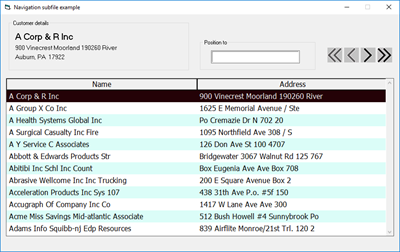
This program shows a simple page-at-a-time subfile that would be used for navigation through a file. Once a row is located, the user would initiate an action. That action isn't shown in the is example; this example focuses on populating and navigating the subfile.
DclDiskFile  Name(Cust) +
             Type(*INPUT) +
             Org(*INDEXED) +
             Prefix(Cust_) +
             NetBlockFactor(*Calc) +
             ImpOpen(*Yes) +
             AddRec(*No) +
             FileDesc('Examples/CMastNewL2') +
             DBDesc('*PUBLIC/Cypress')

// These data structures aren't used in this program, but provide a
// potential discussion point.
// DclDS CustDS  ExtDesc(*Yes) +
//               FileDesc('Examples/CMastNewL2') +
//               DBDesc('*PUBLIC/DG NET Local') +
//               Prefix(Cust_)

// DclDS sbfCustDS  ExtDesc(*Yes) +
//                  FileDesc('Examples/CMastNewL2') +
//                  DBDesc('*PUBLIC/DG NET Local') +
// Prefix(SbfCust_)This value controls how many rows are presented in the subfile.
DclConst SUBFILE_ROWS Value(12)

labelName.Caption = ''
labelAddress.Caption = ''
labelCSZ.Caption = ''

sbfCust_ShowFirstPage()End of mainline.
First page requested.
BEGSR imageFirstPage Click
    sbfCust_ShowFirstPage()
ENDSRNext page requested.
BEGSR imageNextPage Click
    Chain sbfCust Key(sbfCust.RowCount)
    SetGT Cust Key(sbfCust_CMName)
    sbfCust_ShowNextPage()
ENDSRPrevious page requested.
BEGSR imagePreviousPage Click
    sbfCust_ShowPreviousPage()
ENDSRLast page requested.
BEGSR imageLastPage Click
    sbfCust_ShowLastPage()
ENDSRWatch for ENTER key in the textboxPositionTo textbox.
BegSr textboxPositionTo KeyPress
    DclSrParm KeyAscii TYPE(*INTEGER) LEN(2) BY(*REFERENCE)

    DclConst ENTER_KEY Value( 13)
DclConst EAT_KEY Value( 0)Watch for an Enter keypress when ioPosition has focus. End the keypress event handler by setting KeyAscii to EAT_KEY (0) and then position the subfile.
    If (KeyAscii = ENTER_KEY)
        KeyAscii = EAT_KEY
        sbfCust_PositionTo(textboxPositionTo.Value)
        textboxPositionTo.Value = *Blanks
    EndIf
EndSrThe current row changed in the subfile.
BegSr sbfCust RecSwitch
DclSrParm FromRec Type(*INTEGER) LEN(4)Read subfile record on every subfile record switch to have that subfile row's fields available. The AVR Classic subfile reports zero-based row and column values, and the subfile RRN is one based. When chaining to the subfile with the subfile Row property, be sure to add one to it to 'translate' it to the corresponding RRN.
Chain sbfCust Key(sbfCust.Row + 1) NotFnd(*In50)Populate customer info panel with fields from the just-read subfile row.
    sbfCust_SetInfoDisplay()
EndSrThis subfile event handler fires as the subfile row is changing. The subfile heading is a considered a row, just like the data rows. The subfile heading row's ordinal position is -1 and the first data row is zero. If the user moves the current row the entire subfile is selected and that is very jarring to the user. This code looks to see if the user attempted to move into the header and moves the row selected back to the twop row (the zeroth row).
BegSr sbfCust SelChangingInhibit user moving to heading row of subfile.
DclConst HEADING_ROW Value(-1)Uncomment this LeaveSr and user move the row to the top of the
subfile with the up arrow key to see the default behavior arrow
key behavior.
    If (sbfCust.Row = HEADING_ROW)
        sbfCust_GoToTopRow()
    EndIf
EndSrClear the subfile and set its RRN to zero--making it ready for a a new page.
BegSr sbfCust_InitializeInitialize and clear subfile.
    sbfCust_RRN = 0
    sbfCust.ClearObj()
EndSrSet the first and previous page buttons' enabled status.
BegSr SetLeftButtonsStatus
DclSrParm Enabled Type(*Ind)AVR Classic doesn't have an image button. This program uses the image control to simulate image buttons. This is a little extra work because you need enabled and disabled images, but it removes dependence on a third-party button control. See the note at the bottom of this page to read about a way to create images for this purpose.
    If (Enabled)
        LoadPicture File('left-end-arrow.jpg') target(imageFirstPage)
        LoadPicture File('left-arrow.jpg') target(imagePreviousPage)
        imageFirstPage.Enabled = *True
        imagePreviousPage.Enabled = *True
    Else
        LoadPicture File('left-end-arrow-disabled.jpg') target(imageFirstPage)
        LoadPicture File('left-arrow-disabled.jpg') target(imagePreviousPage)
        imageFirstPage.Enabled = *False
        imagePreviousPage.Enabled = *False
    EndIf
EndSrSet next and last page buttons' enabled status.
BegSr SetRightButtonsStatus
    DclSrParm Enabled Type(*Ind)

    If (Enabled)
        LoadPicture File('right-end-arrow.jpg') target(imageLastPage)
        LoadPicture File('right-arrow.jpg') target(imageNextPage)
        imageLastPage.Enabled = *True
        imageNextPage.Enabled = *True
    Else
        LoadPicture File('right-end-arrow-disabled.jpg') target(imageLastPage)
        LoadPicture File('right-arrow-disabled.jpg') target(imageNextPage)
        imageLastPage.Enabled = *False
        imageNextPage.Enabled = *False
    EndIf
EndSr

BegSr sbfCust_AssignFieldsAssign fields from the Cust file to the subfile.
    sbfCust_RRN = sbfCust.RowCount + 1
    sbfCust_CMName = Cust_CMName
    sbfCust_CMAddr1 = Cust_CMAddr1
    sbfCust_CMCity = Cust_CMCity
    sbfCust_CMState = Cust_CMState
    sbfCust_CMPostCode = Cust_CMPostCode
EndSrShow first page of subfile.
BegSr sbfCust_ShowFirstPagePosition file at top of file.
    SetLL Cust Key(*Start)
    sbfCust_ShowNextPage()
EndSrShow next page of subfile.
BegSr sbfCust_ShowNextPageFill sbfCust with next group of rows from Cust's current file pointer position.
    sbfCust_Initialize()

    Do FromVal(1) ToVal(SUBFILE_ROWS)
        Read Cust
        If (%EOF(Cust))
            Leave
        EndIf
sbfCust_AssignFields()Write the subfile row.
        Write sbfCust

        SetRowColor(sbfCust_RRN - 1)
EndDoSet the enabled/disabled status of the image buttons.
    SetLeftButtonsStatus(MoreRecordsBack())
SetRightButtonsStatus(MoreRecordsForward())Explicitly set the subfile to top row (which implicitly refreshes the customer info at the top of the form.)
sbfCust_GoToTopRow()Give focus to the subfile so its speed keys are in effect.
    sbfCust.SetFocus()
EndSrShow previous page of subfile.
BegSr sbfCust_ShowPreviousPageRead the first row of the subfile to make that row's fields available.
Chain sbfCust Key(1)Position the file at the record in the first row.
SetLL Cust Key(sbfCust_CMName) Err(*Extended)Read backwards from there.
ReadCustOnePageBackwards()Having read backwards a number of rows and then show the page.
    sbfCust_ShowNextPage()
EndSrShow last page of subfile.
BegSr sbfCust_ShowLastPagePosition file pointer at end of file.
SetGT Cust Key(*HiVal)Read backwards from there.
ReadCustOnePageBackwards()Having read backwards a number of rows and then show the page.
    sbfCust_ShowNextPage()
EndSrEvery page (first, previous, next, and last) are displayed with the sbfCust_ShowNextPage routine. To page through the file backwards, this routine reads backwards through the file SUBFILE_ROWS + 1 rows. It does this to position the file pointer so that sbfCust_ShowNextPage displays the correct page.
BegSr ReadCustOnePageBackwards
    DclFld BegOfFile  Type( *Boolean )

    Do FromVal(1) ToVal(SUBFILE_ROWS + 1)
        ReadP Cust BOF(BegOfFile)
        If BegOfFile
            SetLL Cust Key(*Start)
        EndIf
    EndDo
EndSrPosition populated subfile at top row (the zeroth row).
BegSr sbfCust_GoToTopRow
    DclConst TOP_ROW Value(0)
DclConst LEFT_MOST_COLUMN Value(0)The Select method selects the given row of the subfile. If there are no rows in the subfile, the Select method fails. Wrapping it an Eval statement and using Err(*Extended) 'eats' the error letting Select method fail silently. You need to provide a zero-based row and column to the Select method. Zero is the top row and zero is the left-most column. Constants are used to avoid using "magic numbers" that be confusing later.
    Eval F2(sbfCust.Select(TOP_ROW, LEFT_MOST_COLUMN)) Err(*Extended)
EndSrPosition subfile at a new location.
BegFunc sbfCust_PositionTo Type(*Ind)
    DclSrParm PositionToValue Type(*String)
DclFld SaveName Type(*String)Is position-to value key in the file
    SetLL Cust Key(PositionToValue)
If (%FOUND(Cust))If so, show the next page from there.
        sbfCust_ShowNextPage()
        LeaveSr *True
ElseOtherwise, reselect the subfile's top row and display a message.
        sbfCust_GoToTopRow()
        MsgBox Title('Search results') Msg('No records found')
        textboxPositionTo.SetFocus()
        LeaveSr *False
    EndIf
EndFunc

BegSr sbfCust_SetFieldsMove fields from disk file to subfile.
EndSrAssign field values for customer info panel above the subfile.
BegSr sbfCust_SetInfoDisplay

    labelName.Caption      = sbfCust_CMName
    labelAddress.Caption   = sbfCust_CMAddr1
    labelCSZ.Caption       = %TRIM(sbfCust_CMCity) + ', ' ++
                             sbfCust_CMState + '  ' ++
                             sbfCust_CMPostCode
EndSrSet subfile row color.
BegSr SetRowColor
    DclSrParm CurrentRow   Type(*Integer) Len(4)

    If IsEven(CurrentRow)
        sbfCust.RecBackColor[CurrentRow] = labelEvenRowColor.BackColor
    Else
        sbfCust.RecBackColor[CurrentRow] = labelOddRowColor.BackColor
    EndIf
EndSrReturn remainder of integer division.
BegFunc IsEven Type(*Ind)
    DclSrParm Value Type(*Integer) Len(4)

    DclConst EVEN_DIVISOR Value(2)

    LeaveSr Value(%REM(Value, EVEN_DIVISOR) = 0)
EndFuncReturn true if there are more records backward, given the key value on the first row displayed.
BegFunc MoreRecordsBack Type(*Ind)
    Chain sbfCust Key(1)
    SetLL Cust Key(sbfCust_CMName)
    ReadP Cust Err(*Extended)

    LeaveSr Value(NOT %EOF(Cust))
EndFuncReturn true if there are more records forward, given the key value on the last row displayed.
BegFunc MoreRecordsForward Type(*Ind)
    Chain sbfCust Key(sbfCust.RowCount)
    SetGT Cust Key(sbfCust_CMName)
    LeaveSr %Found(Cust)
EndFuncPoll for 'f', 'p', 'n', and 'l' keypresses to behave as accelerator keys for the corresponding subfile page actions.
BEGSR sbfCust KeyPress
    DclSrParm KeyAscii TYPE(*INTEGER) LEN(2) BY(*REFERENCE)

    DclConst LOWER_F_KEY Value(102)
    DclConst LOWER_N_KEY Value(110)
    DclConst LOWER_P_KEY Value(112)
    DclConst LOWER_L_KEY Value(108)

    Case Cond(KeyAscii = LOWER_F_KEY) Sr(sbfCust_ShowFirstPage)
    Case Cond(KeyAscii = LOWER_P_KEY) Sr(sbfCust_ShowPreviousPage)
    Case Cond(KeyAscii = LOWER_N_KEY) Sr(sbfCust_ShowNextPage)
    Case Cond(KeyAscii = LOWER_L_KEY) Sr(sbfCust_ShowLastPage)
    EndCs
ENDSRCreating images for AVR class'c image control.
The FontAwesome site provides free SVG images for Web development. SVG images aren't much help to AVR Classic, but the fa2png site freely translates a FontAwesome SVG to a PNG. Create a 32px PNG with the fa2png site, then use MS Paint to save that PNG as a JPG. (AVR Classic's Image control doesn't work with PNG files.