formMain.vrf.annotated
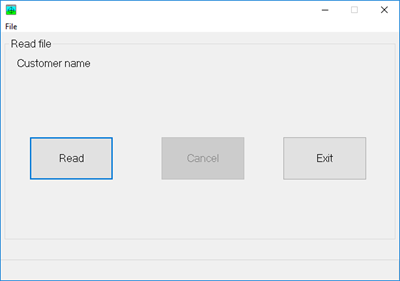
AVR Classic doesn't a separate DB connection object. The DclDiskFile's DBDesc keyword provides the database name. AVR Classic's DB connection implicitly connects when a file is opened.
DclDiskFile  Name(CustomerRO) +
             Type(*INPUT) +
             Org(*INDEXED) +
             Prefix(Customer_) +
             ImpOpen(*No) +
             FileDesc('Examples/CMastNewL1') +
DBDesc('*Public/DG Net Local')Variables declared in the mainline are global to this program. A global variable to govern canceling program.
DclFld Cancel Type(*Ind)AVR Classic supports executable code in the mainline; AVR for .NET does not.
Center this form in the monitor window. AVR Classic forms don't have a property to center a form.
*ThisForm.Top  =   (*Screen.Height - *ThisForm.Height) / 2
*ThisForm.Left =   (*Screen.Width  - *ThisForm.Width ) / 2

labelCustomerName.Caption = ""Open the file (because it was declared with ImpOpen(*No).
Open CustomerRORead button clicked.
BegSr buttonRead Click
    PrepInterface()
    ReadFile()
    PrepInterface()
EndSrExit button clicked.
BEGSR buttonExit Click
    Exsr EndProgram
ENDSRCancel button clicked.
BEGSR buttonCancel Click
    Cancel = *On
ENDSR

BEGSR formMain QueryUnload
    DclSrParm Cancel TYPE(*IND) BY(*REFERENCE)
DclSrParm UnloadMode TYPE(*INTEGER) LEN(2)A form's QueryUnload is like AVR for .NET's form's FormClosing event. There is no other form closing events in AVR Classic. If the Cancel property is not set to *On, this event is that last place to do program cleanup before the program ends.
You can also use UnloadMode determine how the close was requested. (like .NET's CloseReason).
For example, you could have a compound test as shown below (but commented out).
    DclConst CONTROL_BOX_CLOSE Value(0)

    If buttonCancel.Enabled // AND UnloadMode = CONTROL_BOX_CLOSE
       Cancel = *On
ElseExSr EndProgram
    EndIf
ENDSRThe top-level menu option to end the program.
BEGSR mnuTopFileExit Click
    ExSr EndProgram
ENDSRRead a file from beginning to end.
BegSr ReadFile
DclFld CustomerEOF Type(*Ind)AVR Classic requires a Len keyword for the *Integer type.
    DclFld TenPercent    Type(*Integer) Len(4)
DclFld RecordCount Type(*Integer) Len(4)Calculate 10% of the records in the file.
    TenPercent   = CustomerRO.RecCount / 10
RecordCount = 0Set initial progress bar properties.
    progressbarCustomer.Min     =  0
progressbarCustomer.Max = 10AVR Classic is one-based in most operations.
    progressbarCustomer.Value   =  1
progressbarCustomer.Visible = *OnSet mouse cursor.
    SetMousePtr *AppStarting

Cancel = *OffThis a very common prime-the-pump loop in AVR. Position file pointer at beginning of file.
    SetLL CustomerRO Key(*LoVal)
    Read CustomerRO EOF(CustomerEOF)
DoWhile (NOT CustomerEOF) AND (NOT Cancel)DoEvents causes the loop to check the Windows event loop for activity after every record read.
DoEventsUpdate progress bar?
        RecordCount = RecordCount + 1
        If (RecordCount >= TenPercent)
            RecordCount  = 0
            progressbarCustomer.Value = progressbarCustomer.Value + 1
        EndIf

        labelCustomerName.Caption = Customer_CMName
        Read CustomerRO EOF(CustomerEOF)
    EndDo

progressbarCustomer.Visible = *OffRestore mouse cursor.
    SetMousePtr *Dft
EndSr

BegSr PrepInterfaceToggle buttons' Enabled property.
    buttonRead.Enabled   = (NOT buttonRead.Enabled)
    buttonCancel.Enabled = (NOT buttonCancel.Enabled)
    buttonExit.Enabled   = (NOT buttonExit.Enabled)
EndSr

BegSr EndProgram
    Close CustomerRO
    ExitApp
EndSr