formMain.vr.annotated
These are default WinForm .NET Framework classes that may be used by this class.
Using System
Using System.Collections
Using System.ComponentModel
Using System.Data
Using System.Drawing
Using System.Text
Using System.Windows.Forms

BegClass formMain Extends(System.Windows.Forms.Form) Access(*Public) Partial(*Yes)

/region Default ConstructorAVR for .NET's code-behinds are always classes and classes have constructors. You don't usually put code here. Put set-up code in the form's Load event. Note: Do not remove the constructor or the InitializeComponent() call. The .NET Framework needs this in place.
BegConstructor Access(*Public)Required for Windows Form Designer support
InitializeComponent()TODO: Add any constructor code after InitializeComponent call
    EndConstructor

/endregionAll variables declared in the mainline are global to the class. A global variable to govern canceling program.
DclFld Cancel Type(*Boolean)Declare a database object--this provides the DB connection with the given database name.
DclDB pgmDB DBName("*Public/DG Net Local")A file opened for read-only purposes.
    DclDiskFile  CustomerRO +
          Type(*Input) +
          Org(*Indexed) +
          Prefix(Customer_) +
          File("Examples/CMastNewL1") +
          DB(pgmDB) +
          ImpOpen(*No) +
RnmFmt(CUSTRO)AVR for .NET doesn't support executable code in the mainline; you can only put declarations in AVR for .NET's mainline. You generally put program setup code in a form's Load event in AVR for .NET.
    BegSr Form1_Load Access(*Private) Event(*this.Load)
        DclSrParm sender *Object
DclSrParm e System.EventArgsThis event occurs when a form is first loaded. Put form "startup" code here (ie open files).
labelCustomerName.Text = String.EmptyAVR for .NET requires you to explicitly connect to the database.
        Connect pgmDB
        Open CustomerRO
    EndSr

    BegSr Form1_FormClosing Access(*Private) Event(*this.FormClosing)
        DclSrParm sender Type(*Object)
DclSrParm e Type(System.Windows.Forms.FormClosingEventArgs)This event occurs when a form is closing.
By setting e.Cancel = *True you can cancel the closing.
You can also use e.CloseReason to determine how the close was requested. See the CloseReason enum for more info. For example, you could have a compound test as shown below (but commented out).
        If buttonCancel.Enabled // AND e.CloseReason = CloseReason.UserClosing
            e.Cancel = *True
        EndIf
    EndSr

    BegSr Form1_FormClosed Access(*Private) Event(*this.FormClosed)
        DclSrParm sender Type(*Object)
DclSrParm e Type(System.Windows.Forms.FormClosedEventArgs)This event occurs when a form is closed.
Put form "housecleaning" code here (ie close files).
        Close *All
        Disconnect pgmDB
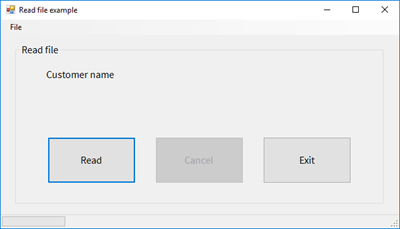
EndSrOccurs when Read button is clicked.
    BegSr buttonRead_Click Access(*Private) Event(*this.buttonRead.Click)
        DclSrParm sender Type(*Object)
        DclSrParm e Type(System.EventArgs)

        PrepInterface()
        ReadFile()
        PrepInterface()
EndSrOccurs when Cancel button is clicked.
    BegSr buttonCancel_Click Access(*Private) Event(*this.buttonCancel.Click)
        DclSrParm sender Type(*Object)
        DclSrParm e Type(System.EventArgs)

        Cancel = *ON
EndSrOccurs when Exit button is clicked.
    BegSr buttonExit_Click Access(*Private) Event(*this.buttonExit.Click)
        DclSrParm sender Type(*Object)
        DclSrParm e Type(System.EventArgs)

        EndProgram()
EndSrOccurs when the Exit menu option is used.
    BegSr exitToolStripMenuItem_Click Access(*Private) Event(*this.exitToolStripMenuItem.Click)
        DclSrParm sender Type(*Object)
        DclSrParm e Type(System.EventArgs)

        EndProgram()
EndSrEnd of event handlers.
Read a file from beginning to end. Progress in 10% increments.
    BegSr ReadFile
        DclFld TenPercent    Type(*Integer4)
DclFld RecordCount Type(*Integer4)Calculate 10% of the records in the file.
        TenPercent = CustomerRO.RecCount / 10
RecordCount = 0Set initial progress bar properties.
        progressbarCustomer.Minimum =  0
        progressbarCustomer.Maximum = 10
        progressbarCustomer.Value =  0  // .NET is zero-based.
progressbarCustomer.Visible = *OnChange cursor.
        *This.Cursor =  System.Windows.Forms.Cursors.AppStarting

        Cancel = *Off

        SetLL CustomerRO Key(*LoVal)
        Read CustomerRO

DoWhile (NOT CustomerRO.IsEof) AND (NOT Cancel)DoEvents causes the loop to check the Windows event loop for activity after every record read.
            DoEvents
RecordCount = RecordCount + 1Update progress bar?
            If ( RecordCount >= TenPercent )
                RecordCount  = 0
                progressbarCustomer.Value = progressbarCustomer.Value + 1
            EndIf

            labelCustomerName.Text = Customer_CMName
            Read CustomerRO
        EndDo

progressbarCustomer.Visible = *OffRestore cursor.
        *This.Cursor = System.Windows.Forms.Cursors.Default
    EndSr

    BegSr PrepInterface
        buttonRead.Enabled = (NOT buttonRead.Enabled)
        buttonCancel.Enabled = (NOT buttonCancel.Enabled)
        buttonExit.Enabled = (NOT buttonExit.Enabled)
    EndSr

    BegSr EndProgram
        Application.Exit()
    EndSr

EndClass